Generate slides with AI using Slidev
Slidev lets you write presentations in Markdown. Combine it with AI and you can create slides in an hour instead of four.
I used to spend 3-4 hours on a presentation. Open PowerPoint, fight with layouts, drag boxes around, align text, find icons. Half the time was spent on formatting, not content
Now I generate slides with Claude Code in under an hour. The trick: Slidev
Presentations as code
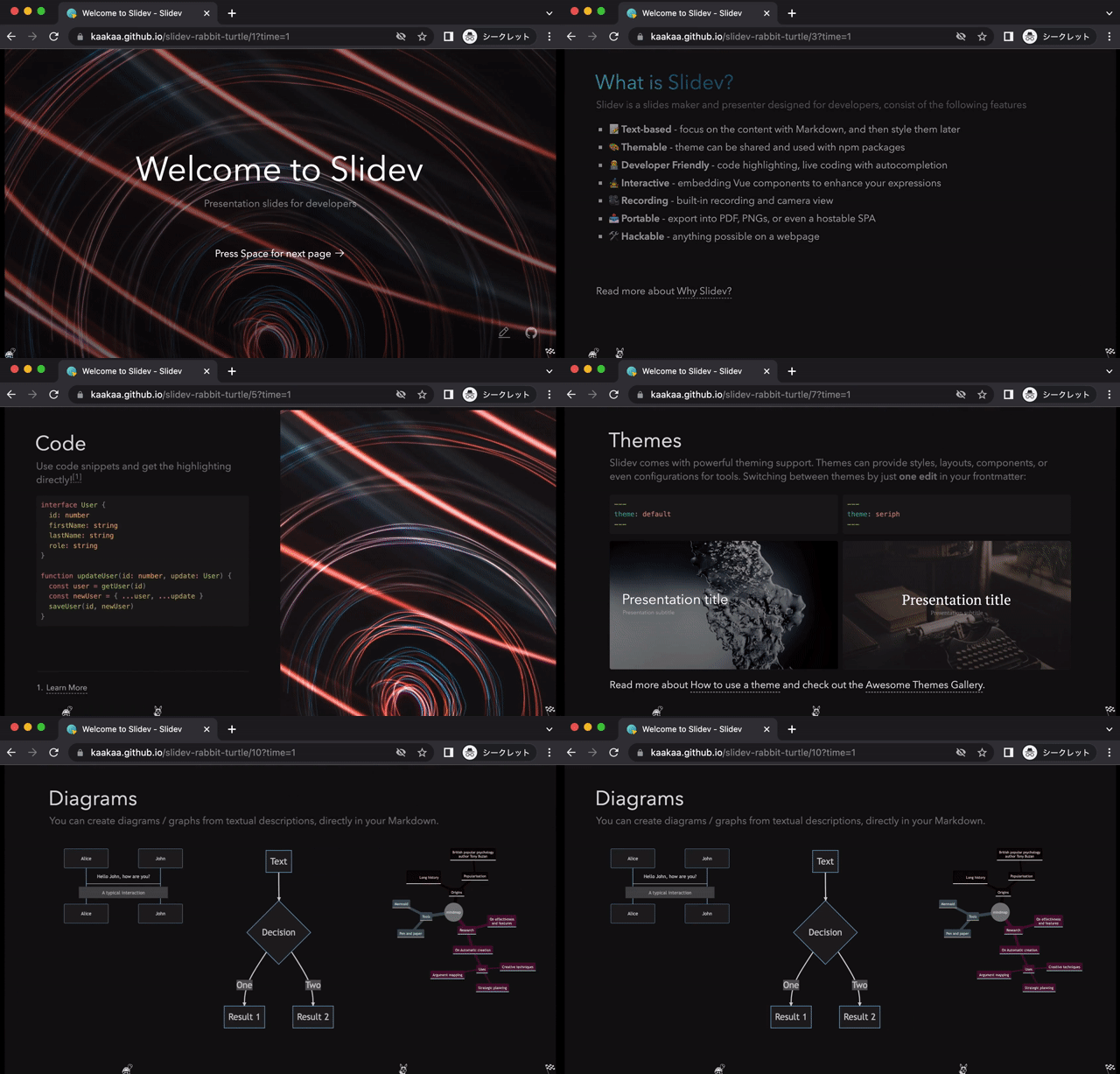
Slidev is a slide framework for developers. You write Markdown, it renders slides. No drag and drop. No clicking through menus. Just text
npm init slidev@latestA slide is just Markdown with --- separators:
---
theme: default
---

# My presentation

First slide content

---

## Second slide

- Point one
- Point two
- Point three
That’s it. Run slidev and you get a live presentation in your browser. Hot reload included
Why this matters for AI
PowerPoint and Google Slides are visual tools. AI can’t click buttons or drag elements. It can generate images, but you still assemble everything manually
Slidev is text. Text is what LLMs do best
Tell Claude Code “create a presentation about Kubernetes architecture” and it writes the entire thing. Markdown, code blocks, diagrams, all in one go. No copying from ChatGPT into PowerPoint slide by slide
Mermaid diagrams without effort
This is where it gets interesting. Slidev has built-in Mermaid support
---

## System architecture

```mermaid {scale: 0.8}
flowchart LR
    A[Client] --> B[Load Balancer]
    B --> C[API Gateway]
    C --> D[Service A]
    C --> E[Service B]
    D --> F[(Database)]
    E --> F
```
That renders as an actual diagram. No Lucidchart. No draw.io. No exporting PNGs and placing them manually
Ask Claude to add a sequence diagram explaining authentication flow? It writes the Mermaid code directly. You see the result instantly
sequenceDiagram
    User->>Frontend: Login request
    Frontend->>Auth Service: Validate credentials
    Auth Service->>Database: Check user
    Database-->>Auth Service: User data
    Auth Service-->>Frontend: JWT token
    Frontend-->>User: Authenticated
Complex diagrams that would take 30 minutes to draw by hand appear in seconds
Code blocks that actually work
Slidev uses Shiki for syntax highlighting. Your code looks good by default
## Implementation

```typescript {lines: true}
async function deployService(config: ServiceConfig) {
  const cluster = await getCluster(config.env)
  await cluster.apply(config.manifest)
  return cluster.waitForReady(config.name)
}
```
You can highlight specific lines, show line numbers, even do live coding with Monaco editor integration. Perfect for technical presentations
Presenter mode
Press P during your presentation and you get a presenter view. You see your current slide, the next slide, your speaker notes, and a timer. Your audience only sees the current slide
Add notes in your Markdown:
---

## Kubernetes architecture

Your slide content here

<!--
Speaker notes go here.
Remind audience about the demo.
Mention the 99.9% uptime requirement.
-->
The notes appear only in presenter mode. You know what to say, the audience sees clean slides
This is standard in PowerPoint, but here it’s just a comment in your Markdown. Claude can generate notes along with the slides
My workflow with Claude Code
Here’s how I actually use this:
- Create a new Slidev project
- Tell Claude what the presentation needs to cover
- Review the generated slides
- Ask for adjustments, more diagrams, better examples
- Export to PDF or present directly
A 20-slide technical presentation takes about an hour. Most of that is reviewing and tweaking, not creating from scratch
The Mermaid diagrams alone save massive time. Instead of “I’ll add a diagram later” (which never happens), I get proper architecture diagrams, flowcharts, and sequence diagrams in every presentation
Getting started
Install and create a project:
npm init slidev@latest my-presentation
cd my-presentation
npm run dev
Edit slides.md. Add your content. The browser updates instantly
Export to PDF when you’re done:
npx slidev exportOr build a static site to host:
npx slidev buildThe real benefit
The point isn’t that AI writes your presentation. You still need to know what to say. You still review everything
The point is removing friction. No fighting with layouts. No hunting for icons. No manually drawing diagrams. You focus on content, AI handles the formatting
3-4 hours becomes 1 hour. That’s time back for actual work
Enjoyed this article? Share it!